
ENGLISH
CoMapeo Updates: Version 9 is here!
The last update of CoMapeo Mobile v9 is now available! It includes changes that will make it easier to manage your community mapping team: join a project, leave it, and receive invitations right from your first use. We’ve also fixed some issues with category translations.
✅ Updates
In CoMapeo Mobile v9, we’ve improved how you manage your team and your project.
Coordinators can leave a project
Since CoMapeo Mobile Abare v8, Coordinators have been able to remove other team members. Now, they can also leave a project from the “Collaborator Information” screen on their device.
If you are the last Coordinator on the project, CoMapeo will prompt you before you confirm. Once you leave, the project will disappear from your Project List, and you will no longer be able to view or add observations. All observations you have recorded in that project will be deleted from your device.

Please note that it is not yet possible for a Coordinator to remove a Desktop device. In the case of a Remote File, they also cannot remove it from the “Team” screen, but can do so via “Coordinator Tools.”
All devices can leave a project
From the “Collaborator Information” screen, any user can leave a project at any time. Upon doing so, they will no longer see or receive observations from that project and will appear as a “Past Collaborator” on the project’s “Team” screen.
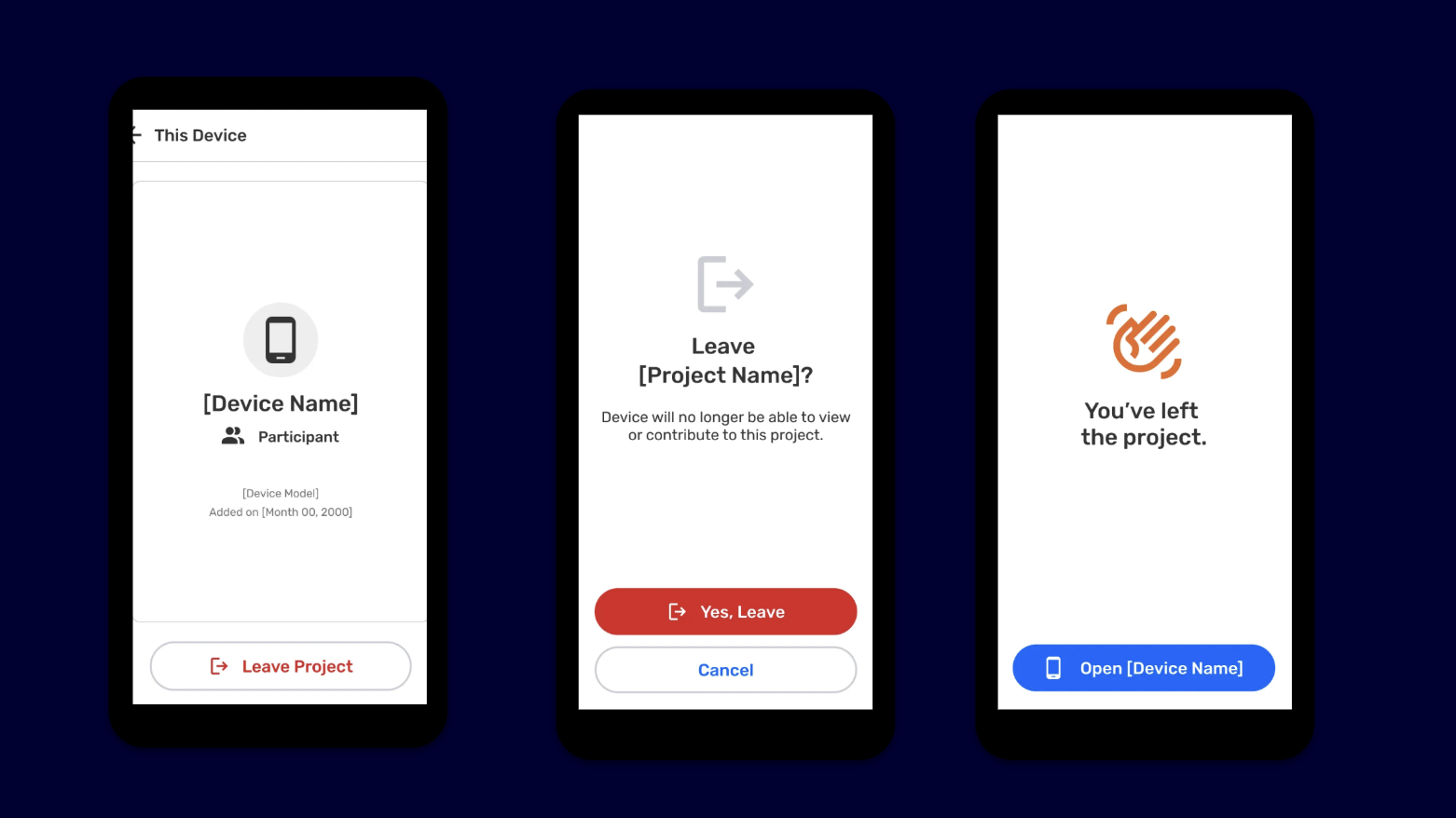
If you are the last team member (coordinator or participant), CoMapeo will also notify you. Once you confirm, the project will be removed from your list, you will lose access to all recorded observations, and you will not be able to make new contributions. All observations contributed to this project will be deleted from your device.
Other improvements
Receiving invitations during onboarding
Previously, it wasn’t possible to receive an invitation to join a project while setting up CoMapeo for the first time. Now you can, as long as you’ve already named your device and read part of the initial instructions.
Re-inviting a device that left the project
If a collaborator was removed or voluntarily left a project, they can now receive an invitation to rejoin the project.
Translation of category names
Sometimes, when importing custom category files, the categories would not appear translated correctly. That issue has now been resolved.
Removing a project creator
Previously, when a Coordinator tried to remove a project creator, an error occurred. This now works without issues.
❌ Known Issues
Default Exchange SettingsThe Exchange screen displays “Exchange Preview” as the default option. Soon, “Exchange All” will be the first option to make it easier to exchange observations and routes.Gitbook issue: [paste link]
Passcode and File UploadsWhen the CoMapeo security password is enabled, you cannot upload map files or categories. The team is already working on this.
You cannot accept an invitation while editing an observationIf you accept an invitation to join a project while editing an observation, the app may crash. To fix this, restart CoMapeo and access the project you were invited to.
We are excited to share more details about the next iterations of CoMapeo over the coming weeks and months. Stay tuned!
Email us at help@comapeo.app / ayuda@comapeo.app
You can also find us on Discord!
You can download and read more about CoMapeo on comapeo.app
SPANISH
Últimas actualizaciones en CoMapeo: la versión 9 ya está aquí!
¡Hola!¡Ya está disponible la última actualización de CoMapeo Móvil (v9)! Esta versión trae cambios que harán más fácil gestionar tu equipo de mapeo comunitario: únete a un proyecto, salte de él y recibe invitaciones desde el primer uso. También corregimos algunos problemas con la traducción de categorías.
✅ Mejoras
En CoMapeo Móvil v9, mejoramos la forma en que gestionas tu equipo y tu proyecto. Ahora es posible:
Coordinadores pueden salir de un proyecto
Desde CoMapeo Móvil Abare (v8), los Coordinadores ya podían eliminar a otros miembros del equipo. Ahora, también ellos pueden salir de un proyecto desde la pantalla “información del colaborador”, de su dispositivo.
Si eres el último Coordinador del proyecto, CoMapeo te avisará antes de que confirmes. Una vez que salgas, el proyecto desaparecerá de tu lista de proyectos y no podrás ver ni agregar observaciones. Todas las observaciones que hayas registrado en ese proyecto se eliminarán de tu dispositivo.
Ten en cuenta que aún no es posible que un Coordinador elimine un dispositivo Desktop. En caso de un Archivo Remoto, tampoco puede eliminarlo desde la pantalla de “Equipo”, pero sí hacerlo a través de “Herramientas del Coordinador”.
Todos los dispositivos pueden dejar un proyecto
Desde la pantalla “Información del colaborador”, cualquier usuario podrá dejar un proyecto cuando lo desee. Al hacerlo, dejará de ver y recibir observaciones de ese proyecto y aparecerá como “Colaborador pasado” en la pantalla “equipo” del proyecto.
Si eres el último integrante del equipo (coordinador o participante), CoMapeo también te lo hará saber. Una vez que confirmes, el proyecto se eliminará de tu lista, perderás acceso a todas las observaciones registradas y no podrás realizar nuevas contribuciones. Todas las observaciones aportadas a este proyecto se eliminarán de tu dispositivo.
Otras mejoras
Recibir invitaciones durante las configuración inicial
Antes, no era posible recibir una invitación a unirse a un proyecto mientras configurabas CoMapeo por primera vez. Ahora sí, siempre que ya hayas puesto un nombre a tu dispositivo y leído parte de las instrucciones iniciales.
Volver a invitar a un dispositivo que salió del proyecto
Si un colaborador fue eliminado o salió voluntariamente de un proyecto, ahora puede recibir una invitación para reincorporarse al proyecto.
Traducción de nombres de categorías
A veces, al importar archivos de categorías personalizadas, éstas no aparecían traducidas correctamente. Ese problema ya está resuelto.
Eliminar al creador de un proyecto
Antes, cuando un Coordinador intentaba eliminar al creador de un proyecto, aparecía un error. Ahora funciona sin inconvenientes.
❌ Problemas conocidos
Configuración predeterminada de intercambio
- La pantalla de Intercambio muestra “Vista previa de intercambio” como opción predeterminada. Próximamente, “Intercambiar todo” sea la primera opción para facilitar el intercambio de observaciones y trayectos.
Reporte de problema:
Contraseña y subida de archivos
- Cuando la contraseña de seguridad de CoMapeo está activa, no es posible subir un archivo de mapas o categorías. El equipo ya está trabajando en ello.
Reporte de problema:
No se puede aceptar invitación mientras se edita una observación
- Si aceptas una invitación a unirte a un proyecto, mientras editas un observación, la aplicación puede bloquearse. Para solucionarlo, reinicia CoMapeo y accede al proyecto al que fuiste invitado.
Próximamente compartiremos más detalles de las siguientes mejoras en CoMapeo. ¡Te invitamos a estar atento!
Si tienes dudas o consultas, escríbenos a help@comapeo.app / ayuda@comapeo.app
También nos puedes encontrar en Discord!
Descarga y conoce más de CoMapeo en comapeo.app